Evenflo
- 4.6
- Rating
- 50.00K
- Installs
- Free
- Price

 Analysis by App-foxy
Evenflo is a parenting app from Evenflo that focuses on making compatible car-seat routines easier to manage and, more importantly, helping families pay closer attention to safety. I approached it less like a typical companion app and more like a tool I would open before a journey, during a rushed departure, or when checking that a child’s seat is being used as intended. That distinction matters: its value is tied to the car seat and the family’s daily travel habits, not to endless screen time.
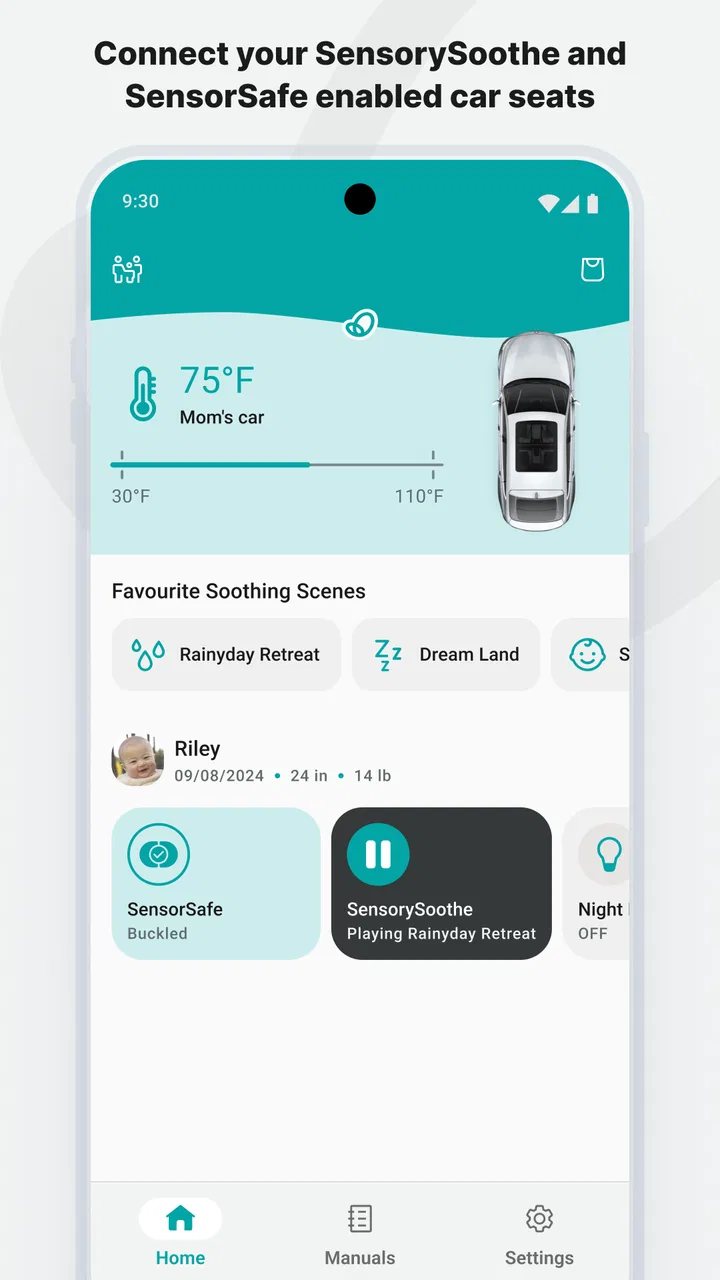
My first impression was that the app makes the most sense for parents who already use Evenflo equipment that works with its connected safety features. The two ideas at its center are SENSORYSOOTHE and SENSORSAFE. One is aimed at helping settle a child during travel, while the other is concerned with safety awareness around the child’s time in the vehicle. I would not treat either as a replacement for careful installation, supervision, or the instructions for the specific seat. Instead, I see the app as an extra layer of attention at moments when parents are often distracted.
How connectivity changes the experience
I find connectivity most useful when it gives a caregiver a reason to pause and follow the same deliberate routine, rather than adding another screen to watch. Before relying on it, I’d try the relevant functions while parked and agree with other regular drivers on what they should do if the phone is unavailable. That makes it easier to see which parts of the experience genuinely help your family—and where a simple handoff conversation matters more.
You May Also Like

 Blood Strike: 2.5 Anniversary
Blood Strike’s Loadouts Turn Every Drop Into a Tactical Gamble
A close look at Blood Strike’s custom loadouts: how fast access to signature weapons reshapes its battle royale rhythm, rewards preparation, and narrows the gap between fights.

 Pandora - Music & Podcasts
Pandora’s Music Is Easy to Start, but Harder to Recover
Pandora’s strength is its low-effort path from a seed to a station. Its weak spot is how much confidence it asks you to place in connection, setup, and quiet recovery.

 8 Ball Pool
 Is Built on Rivalries, Rematches, and Routine
A close look at the rivalries, rematches, shared routines, and unanswered safety questions that turn a quick pool match into a persistent mobile community.

 Samsung Music
’s Quiet Strength Is Playing What You Already Own
Its reach comes less from spectacle than from dependable access to a personal library. That simplicity is both the app’s strongest retention engine and its ceiling.

 AccuWeather: Weather Radar
AccuWeather Review: A Quick, Clear Forecast for Everyday Decisions
For everyday plans, the best forecast is the one you can understand quickly. AccuWeather makes rain timing, radar, and local conditions easy to act on, with a few trade-offs.

 Hill Climb Racing
Why Hill Climb Racing Still Turns Crashes Into One More Run
A tiny car, a bumpy hill and one more upgrade: Hill Climb Racing keeps resurfacing because its simple chaos makes every near-miss feel personal.
More From Our News Desk
View All News


Useful when a journey is being prepared
The strongest use case is not browsing the app casually. It is the short window before leaving home. A parent may be carrying a bag, answering a message, trying to get a toddler into a coat, and remembering whether everything needed for the drive is already in the car. In that situation, a connected safety companion can turn a vague feeling of “I think we are ready” into a more deliberate routine.
I found that this kind of app is best approached as a checklist partner rather than as an authority. I would still inspect the harness, confirm the seat position, and follow the car-seat manual. The app can support awareness, but it cannot physically tighten a strap or correct an installation. That is an important trade-off: digital guidance is most helpful when it reinforces a habit that already exists, not when it encourages a parent to stop checking the equipment directly.
Connectivity becomes especially relevant when the app is expected to communicate with a compatible seat or safety component. That relationship is what separates this product from a general parenting notebook. A standard notes app can record a child’s routine, but it cannot serve the same purpose as a system designed around Evenflo’s safety technology. At the same time, the connected approach introduces another point that can fail, so I would not build an urgent travel decision around the assumption that a phone connection will always behave perfectly.
A realistic morning with a child in the car
Imagine a weekday school run. The child has fallen asleep, one parent is late for work, and a grandparent is taking the child home later. This is where the app’s practical value becomes clearer. I would use it before leaving to create a consistent safety pause, then make sure the other caregiver understands that the app is an aid rather than a substitute for the seat’s physical checks.
The useful insight here is that connected safety works best when more than one caregiver follows the same routine. If one adult relies on the app while another ignores the seat’s instructions, the technology does not solve the inconsistency. I would establish a simple family rule: the person placing the child in the seat performs the hands-on check, and the app is used as an additional prompt or awareness tool. That keeps the digital layer in its proper place.
SENSORYSOOTHE also gives the product a different feel from a purely alert-driven safety tool. Travel with a young child is not only about preventing mistakes; it is also about making the ride calmer. I would see this feature as potentially useful during transitions, particularly when a child is already tired or unsettled. However, I would avoid treating soothing technology as a guaranteed way to stop crying. Children react differently, and a calm ride still depends on timing, comfort, temperature, and the adult’s attention.
What happens when the phone is not in the ideal place?
Real mobile use is messy. A phone may be in a coat pocket, left inside the house, handed to another caregiver, or nearly out of battery. A parent may also be moving between the front door and the vehicle while the child is already waiting. These are the moments when I would be most cautious about depending on the app.
The app’s connected role means the phone should be treated as one part of the setup, not the entire safety system. If I were travelling with a child, I would complete the physical seat check even if the application opened normally. Conversely, if the app did not appear to respond as expected, I would not assume the seat was unsafe solely because the digital experience was interrupted. I would return to the manufacturer’s instructions and inspect the equipment itself.
That recovery habit is one of the most important practical lessons. Parents often want a clear green light from an app, but responsible car-seat use cannot be reduced to a single screen. A good workflow is: check the seat manually, open the app when convenient, respond to any relevant information, and avoid rushing because the phone is slow. This makes the technology useful without giving it more authority than it deserves.
Failure and recovery in everyday use
Any connected experience can involve friction. The phone may need attention at the exact moment a child needs attention more. A connection may not be immediately available, or the app may take longer to become useful than expected. I would consider that normal technology friction rather than a reason to panic, provided the parent has a dependable manual routine.
My recommended recovery approach is deliberately simple. First, stop trying to solve the problem while the vehicle is moving. Second, park safely if a closer look is necessary. Third, check the seat using the physical instructions and make sure the child is secured correctly. Only after that would I reopen the app, verify the phone’s basic connection, and try the connected function again. This sequence prevents troubleshooting from becoming a distraction.
Another practical point is caregiver handoff. If a child is going from a parent’s car to a grandparent’s car, the app may not be equally useful on both phones or in both vehicles. I would explain the safety routine in plain language rather than assuming another adult will know how to use the application. The connected feature can support a family system, but it does not automatically transfer knowledge between caregivers.
This is also where I would draw a line between the app and a general emergency tool. I would not use it as a replacement for contacting help, handling a medical concern, or dealing with a child who is distressed in the vehicle. Its role is narrower: supporting the Evenflo car-seat experience and helping families stay attentive to travel safety. Keeping that boundary clear makes the product more trustworthy.
Mobile contexts: home, driveway, and road
Where I use the app affects how useful it feels. At home, I have more time to look at the setup and think through a routine. In the driveway, I am more likely to use it as a final reminder before starting the trip. Once the car is moving, my attention belongs on driving, so I would not interact with the phone at all. That sounds obvious, but it is an important design test for any parenting tool associated with a vehicle.
The best mobile workflow is therefore front-loaded. I would prepare the phone and the seat before the child is buckled in, rather than trying to configure anything while managing a restless passenger. This reduces the chance that a useful feature becomes an extra source of stress. It also makes the app more realistic for families who leave at busy times, when every additional step has to justify itself.
I can also see value during longer trips, especially when parents are sharing driving responsibilities. The app may help keep safety awareness present in the background of the journey, while SENSORYSOOTHE addresses the child’s comfort more directly. Still, I would avoid checking the phone repeatedly. The more often a parent feels compelled to monitor a screen, the more carefully that workflow needs to be reconsidered.
For families who travel between several vehicles, the decision is more complicated. A connected Evenflo setup may be appealing in the main family car, but it may not offer the same convenience when the child rides with relatives or in a second vehicle. In that case, the app is most valuable as part of a primary-car routine, while the physical installation and harness habits remain portable. I would not choose it solely because I wanted one universal digital dashboard for every vehicle.
Data-conscious use and sensible expectations
Because this is a connected parenting product, I would think about data and phone habits before making it part of the family routine. I prefer to know which functions genuinely need an active connection and which actions are simply preparation or reference. That keeps the experience more predictable and avoids treating constant phone communication as a requirement for basic safe travel.
I would also be selective about notifications and attention. A safety-related prompt can be useful, but too many alerts can become background noise, especially for parents already managing school messages, work calls, and household reminders. My practical advice is to pay attention to the information that changes what you do, while avoiding the temptation to turn every app interaction into a ritual. A short, repeatable check is better than a complicated process that gets abandoned.
Battery awareness matters as well. A phone that is nearly empty is not a dependable companion for any connected routine. I would charge it before a long trip and make sure the person responsible for the child knows the manual procedure if the phone is unavailable. This is not a criticism unique to Evenflo; it is the basic trade-off of adding a mobile layer to a physical product. Convenience comes with another device to maintain.
I would be equally careful with shared phones. If several adults use the same vehicle, the family should agree on who is responsible for checking the app and who is responsible for the seat itself. Otherwise, everyone may assume someone else handled it. The most effective data-conscious approach is also a responsibility-conscious one: use the app when it adds clarity, but never allow the digital record or connection to replace direct accountability.
Who will appreciate it most?
I think the app is a good fit for parents who want a more structured car-seat routine and who already use compatible Evenflo equipment. It is particularly suited to families with frequent short trips, multiple caregivers, or children who become unsettled during transitions. In those situations, a dedicated tool can be more relevant than a generic parenting app because it is tied to the specific moment of getting into the car.
It may also appeal to first-time parents who appreciate reminders and want technology to reinforce careful habits. The important qualification is that the app should be learned before a rushed trip, not discovered while trying to leave. I would spend a quiet few minutes understanding how it fits into the seat routine, then keep the actual departure process short.
I would skip it if I wanted a broad child-development tracker, a feeding log, a sleep diary, or a general family organizer. This is not the right category for those needs. I would also hesitate if my car-seat setup is not compatible with the connected functions, because the central benefit would be reduced to a less relevant app experience. In that situation, the manufacturer’s printed guidance and a straightforward manual check may be the better choice.
How it compares with ordinary alternatives
The usual alternative is not another sophisticated parenting platform; it is a manual routine supported by the car-seat manual and perhaps a reminder in a phone calendar. That approach has a real advantage: it does not depend on a connection, a charged phone, or another layer of setup. For a family that already checks the harness carefully and rarely changes caregivers, the simpler method may be enough.
Evenflo’s advantage is focus. Instead of asking parents to remember every travel detail themselves, it brings safety awareness and child comfort into one manufacturer-specific experience. That can make sense when the connected features match the family’s equipment and habits. The trade-off is that the app is less flexible than a general organizer and more dependent on the surrounding Evenflo setup.
Compared with a generic soothing app, SENSORYSOOTHE is more closely connected to the car journey rather than being a library of unrelated entertainment. That focus is useful, but it also means I would not expect it to replace a child’s favorite music, a familiar toy, or an adult’s calming presence. Compared with a generic safety checklist, SENSORSAFE is more relevant to the car-seat context, but I would still keep the physical inspection as the final practical safeguard.
What the current app details suggest
Evenflo is free, which makes it easier to try alongside compatible equipment without adding a purchase decision to an already expensive parenting category. It is rated for Everyone, so its presentation is intended for a broad audience, although the person using it will naturally be a parent or caregiver rather than the child. The app was released on December 5, 2022, and its current version is 4.6.2.
Its presence is reasonably established, with over fifty thousand installs and a 4.7 average from around one thousand two hundred ratings. I would read that as encouraging rather than conclusive. A strong average suggests that many users find the experience worthwhile, but connected products can feel very different depending on the car seat, phone, caregiver habits, and expectations. The review volume also gives the app a visible user base without making popularity a substitute for checking compatibility.
The minimum operating-system requirement is iOS or Android 12, so anyone using an older phone should check that point before planning around the app. This is a small detail with a large practical consequence: a family may own compatible Evenflo equipment but still be unable to use the current mobile experience on an older device. I would confirm the phone requirement early, especially if grandparents or babysitters are expected to participate.
My practical setup advice
I would begin by identifying the exact Evenflo seat and the connected functions available with it. Then I would install the app on the phone that will normally travel with the child, rather than treating every family member’s phone as equally responsible. After that, I would test the routine while parked and without a time limit. The goal is to learn what the app contributes before a real departure makes the process feel urgent.
Next, I would create a two-part habit. The first part is physical: position, harness, and the instructions for the seat. The second part is digital: use the app’s relevant safety or soothing function when it adds value. This separation is a useful safeguard because it prevents a connection problem from being mistaken for a seat problem, and it prevents a successful app interaction from creating false confidence.
For shared care, I would teach one short version of the routine to every regular driver. I would not assume that a caregiver needs to understand every screen. They need to know what to check on the seat, when the app is helpful, and what to do if the phone is unavailable. That approach makes the technology less fragile and keeps the child’s safety at the center.
My connectivity verdict
After looking at the app through the reality of mobile travel, I see Evenflo as a focused companion for families using compatible Evenflo car-seat technology, not as a universal parenting platform. Its best contribution is the way it brings a digital reminder and child-comfort idea into a specific travel routine. The connected angle can be genuinely useful before a journey and during planned caregiver routines, especially when it encourages consistency.
Its limitations are just as clear. A phone, battery, connection, and compatible setup can all affect convenience. Parents who prefer a completely offline, manual routine may find the extra layer unnecessary. Families with older phones, several unrelated car seats, or a need for broad parenting tools should look elsewhere or rely more heavily on ordinary alternatives.
My recommendation is to use Evenflo as a supporting layer, never as the only safety check. If its features match your seat and you want a calmer, more deliberate departure routine, the free app is worth trying. If you expect it to replace the manual, the caregiver, or careful attention in the car, it is not the right solution. In my view, that balanced role is where it works best: connected when convenient, useful on the move, and always backed by hands-on responsibility.
FAQs for Evenflo
01What is Evenflo, and what does it offer?
Evenflo is a comprehensive parenting app designed to simplify the journey of raising children. It offers features such as feeding scheduling, diaper change reminders, growth tracking, and sleep logs. The app aims to provide parents with tools to monitor their child's development and ensure their well-being effectively.
02Is Evenflo available on both Android and iOS platforms?
Yes, Evenflo is available for download on both Android and iOS platforms. Users can access the app through the Google Play Store for Android devices and the Apple App Store for iOS devices, ensuring a seamless experience across different operating systems.
03How user-friendly is the Evenflo app for new parents?
Evenflo is designed with user-friendliness in mind, featuring an intuitive interface that is easy for new parents to navigate. The app provides step-by-step guides and helpful tips, ensuring that even those unfamiliar with parenting apps can quickly get the hang of it and utilize its features efficiently.
04Does Evenflo offer any community support features?
Yes, Evenflo includes community support features where parents can connect, share experiences, and seek advice. This supportive environment allows parents to learn from each other and gain insights into managing various parenting challenges, fostering a sense of community and shared learning.
05Are there any costs associated with using Evenflo?
Evenflo offers a free version with essential features, but it also provides a premium subscription for additional functionalities. The premium version includes advanced tracking options, personalized insights, and ad-free usage. Users can decide based on their needs whether the premium features are worth the investment.
Pros
- User-friendly interface
- easy navigation.
- High-quality video streaming options.
- Comprehensive parental controls included.
- Real-time alerts and notifications.
- Secure cloud storage for recordings.
Cons
- Limited free features
- subscription needed.
- Occasional connectivity issues reported.
- Lack of integration with smart home devices.
- Some features are region-specific.
- Requires stable internet for optimal use.

Evenflo
Gallery